Remote Service Manager (RSM) Security
Security for the RSM service is administered by the Access Control Service (ACS). As with other CygNet services, security is set on an application and event basis. The application name of the RSM service is defined in the service configuration file using the keyword ACS_APPLICATION. The default is “RSM.” The security events are listed in the RSM Events table below.
The following tables provide details about RSM security settings. See also Security.
| Service Application Name | Main Security Event | Component-Level Security | Subject to Application Override |
|---|---|---|---|
|
RSM (name defined in service configuration file) |
CHANGE (name defined in service code) |
No |
No |
RSM Events
| Event | Event Description | Authorization | Tasks |
|---|---|---|---|
|
CHANGE |
Service control |
0-None |
View list of services in the service |
|
1-Read |
Inclusive |
||
|
2-Update |
Inclusive |
||
|
3-Add |
Inclusive |
||
|
4-Delete |
Inclusive |
||
|
5-Admin |
|
||
|
ODBC |
Access service records from an ODBC-compliant application |
0-None |
None |
|
1-Read |
View records in the service |
||
|
2-Update |
Edit existing records |
||
|
3-Add |
Add records |
||
|
4-Delete |
Delete records |
||
|
5-Admin |
Inclusive |
||
|
SVCINFO |
Miscellaneous GenServe security management Note: The SVCINFO event allows changes to log settings and use of the GlobalFunctions method SetGenserveInfo without requiring higher privileges on other actions. Other tasks are listed at right. |
5-Admin |
Permission level required to perform the following tasks:
|
RSM Password
The RSM is the only service for which a task can be performed if the ACS is out of service. This is due to the fact that the RSM is used to start and stop services, including the ACS. As such, it needs to be able to control services even if the ACS is not running.
Rather than having RSM security wide-open when the ACS is out of service, you can configure the RSM to prompt the user for a password when this situation occurs. When the password option is enabled, a user must supply the correct password to control services. Once the ACS is running, normal security operations for the RSM resume.
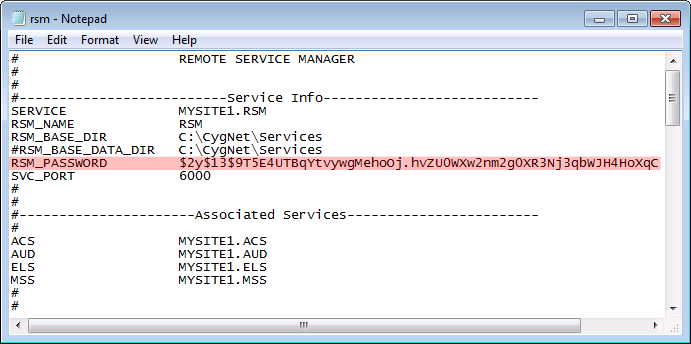
The password is defined in the RSM’s configuration file (Rsm.cfg) by the RSM_PASSWORD keyword. The password is case-sensitive and obfuscated using a password hashing algorithm. The encrypted keyword can be changed using the Config File Manager.
If the password prompt is displayed when the ACS is running, it means that the user is attempting to control a service and does not have sufficient authorization.


